Software Engineering & Cloud System Architecture
The full 8-step end-to-end software engineering lifecycle (plan & analyze, design & architect, develop, test & quality, build & package, deploy & release, operate & monitor, and iterate & improve), the six core disciplines that make up the practice (frontend engineering, backend engineering, data & databases, cloud & infrastructure, DevOps & CI/CD, and observability & operations), a typical software system reference architecture, a RAG/generative AI pipeline example, and a data science/ML pipeline example showing how clients, APIs, and data connect in production. Hover, tap, or focus any component for its description and standard reference.
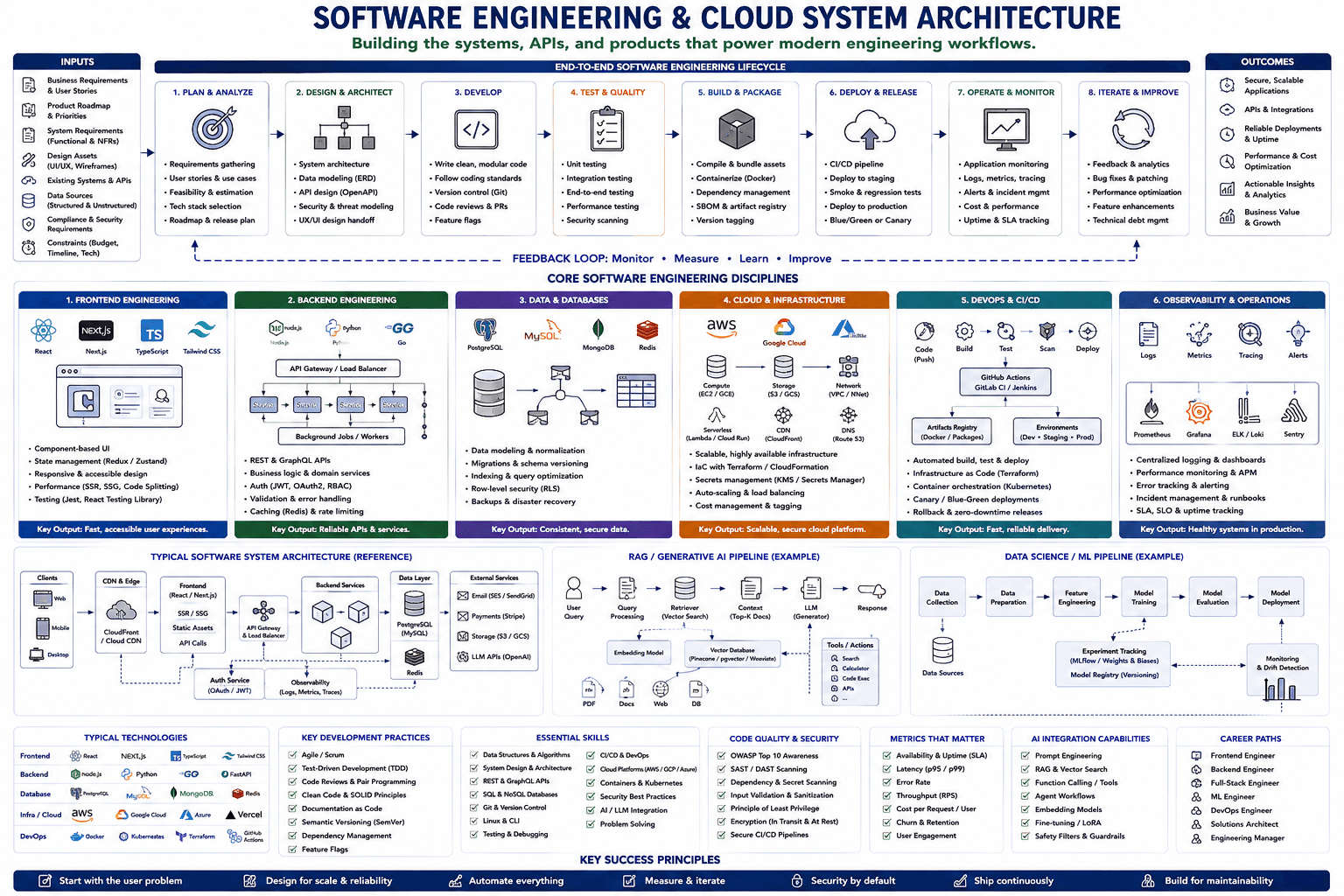
Hover, tap, or focus any component on the drawing (or a circuit below it) for details. Click to pin; move away or click again to clear.
Component Reference
Every component in the diagram above, grouped by section, with its role and the relevant standard.
Inputs
Business Requirements & User Stories
The business requirements and user stories that define what problem the software is meant to solve — the starting input every downstream engineering decision, from architecture to acceptance testing, is judged against.
Product Roadmap & Priorities
The product roadmap and prioritization that sequence which features and fixes get built first, balancing business value against engineering effort and technical risk.
System Requirements (Functional & NFRs)
The functional requirements (what the system must do) and non-functional requirements (performance, availability, security, scalability) that set the technical bar the finished system must clear.
Design Assets (UI/UX, Wireframes)
UI/UX designs and wireframes that define the visual language and interaction flow the frontend must implement — the handoff point between design and engineering.
Existing Systems & APIs
The legacy systems, internal services, and third-party APIs the new build must integrate with — a major constraint on architecture, since almost nothing ships into a truly empty environment.
Data Sources (Structured & Unstructured)
The structured (databases, tables) and unstructured (documents, logs, media) data available to the system — the raw material for every feature, report, and integration built on top of it.
Compliance & Security Requirements
The regulatory, privacy, and security requirements (GDPR, SOC 2, industry-specific rules) that constrain how data is handled and what controls the finished system needs before it can ship.
Constraints (Budget, Timeline, Tech)
The budget, timeline, and technology constraints every plan must fit inside — the practical ceiling that turns an ideal architecture into a shippable one.
Outcomes
Secure, Scalable Applications
Applications and services built to withstand real traffic and real attackers — the core deliverable every stage of the lifecycle, from design review to security scanning, exists to protect.
APIs & Integrations
Well-designed APIs and integrations that let other teams, partners, and internal systems build on top of what was shipped, rather than working around it.
Reliable Deployments & Uptime
Deployments that ship safely and predictably, and the uptime that follows from a mature CI/CD pipeline, observability, and incident response — the operational payoff of disciplined DevOps.
Performance & Cost Optimization
Systems tuned for both latency and cloud spend — performance work and cost optimization are usually the same exercise, since inefficient code and infrastructure are the biggest cost drivers.
Actionable Insights & Analytics
The application telemetry, logs, and analytics that turn a running system into a source of actionable insight for product and engineering decisions, not just a black box.
Business Value & Growth
Revenue, retention, and growth outcomes that tie the engineering investment back to the original business requirements — the final scoreboard that justifies the next round of investment.
Software Engineering Lifecycle
1. Plan & Analyze
Gathers requirements, writes user stories and use cases, assesses feasibility and estimates effort, selects the tech stack, and sets the roadmap and release plan — the step that decides what gets built and how before any code is written.
2. Design & Architect
Designs the system architecture, models the data (ERD), specifies APIs (OpenAPI), threat-models security, and hands off the UX/UI design — the blueprint every later stage builds against.
3. Develop
Writes clean, modular code, follows coding standards, tracks changes in version control (Git), runs code reviews and PRs, and gates risky features behind flags — the core implementation loop.
4. Test & Quality
Runs unit testing, integration testing, end-to-end testing, performance testing, and security scanning — the gate a change must pass before it is trusted to move toward production.
5. Build & Package
Compiles and bundles assets, containerizes the app (Docker), manages dependencies, generates an SBOM and pushes to the artifact registry, and tags the version — turning source code into a deployable artifact.
6. Deploy & Release
Runs the CI/CD pipeline, deploys to staging, runs smoke and regression tests, then deploys to production via blue/green or canary release — the controlled path from artifact to live traffic.
7. Operate & Monitor
Monitors the running application, collects logs/metrics/tracing, manages alerts and incidents, tracks cost and performance, and watches uptime against SLA targets — keeping a shipped system healthy.
8. Iterate & Improve
Feeds user feedback and production analytics back into the backlog, ships bug fixes and patches, optimizes performance, adds features, and pays down technical debt — closing the loop into the next planning cycle.
Feedback Loop: Monitor · Measure · Learn · Improve
The dashed feedback loop that carries monitoring signal, measurement, and lessons learned from step 8 back to step 1 — the mechanism that makes the software engineering lifecycle a genuine loop instead of a one-way pipeline.
Frontend Engineering
1. Frontend Engineering — Stack & UI
The frontend stack — React, Next.js, TypeScript, and Tailwind CSS — and a representative UI mockup showing a component-based page layout with navigation, content, and profile elements.
1. Frontend Engineering — Practices & Key Output
Component-based UI, state management (Redux/Zustand), responsive and accessible design, performance techniques (SSR, SSG, code splitting), and testing (Jest, React Testing Library). Key output: fast, accessible user experiences.
Backend Engineering
2. Backend Engineering — Stack & Services
The backend stack — Node.js, Python, and Go — feeding an API Gateway / Load Balancer that fans out to a chain of services, which in turn feed background jobs and workers for asynchronous processing.
2. Backend Engineering — Practices & Key Output
REST & GraphQL APIs, business logic and domain services, authentication (JWT, OAuth2, RBAC), validation and error handling, and caching (Redis) with rate limiting. Key output: reliable APIs & services.
Data & Databases
3. Data & Databases — Stack & Modeling
The database stack — PostgreSQL, MySQL, MongoDB, and Redis — feeding a data-modeling and normalization flow from raw storage through a schema diagram to a structured table.
3. Data & Databases — Practices & Key Output
Data modeling & normalization, migrations & schema versioning, indexing & query optimization, row-level security (RLS), and backups & disaster recovery. Key output: consistent, secure data.
Cloud & Infrastructure
4. Cloud & Infrastructure — Providers & Topology
The three major cloud providers — AWS, Google Cloud, and Azure — feeding a compute → storage → network topology (EC2/GCE, S3/GCS, VPC/NNet), plus serverless (Lambda/Cloud Run), CDN (CloudFront), and DNS (Route 53).
4. Cloud & Infrastructure — Practices & Key Output
Scalable, highly available infrastructure, IaC with Terraform / CloudFormation, secrets management (KMS / Secrets Manager), auto-scaling & load balancing, and cost management & tagging. Key output: scalable, secure cloud platform.
DevOps & CI/CD
5. DevOps & CI/CD — Pipeline & Registries
The CI/CD pipeline — Code (Push) → Build → Test → Scan → Deploy — orchestrated by GitHub Actions, GitLab CI, or Jenkins, feeding an Artifacts Registry (Docker/Packages) and managed Environments (Dev · Staging · Prod).
5. DevOps & CI/CD — Practices & Key Output
Automated build, test & deploy, infrastructure as code (Terraform), container orchestration (Kubernetes), canary / blue-green deployments, and rollback & zero-downtime releases. Key output: fast, reliable delivery.
Observability & Operations
6. Observability & Operations — Signals & Tooling
The four observability signals — Logs, Metrics, Tracing, and Alerts — captured by the standard open-source and SaaS toolchain: Prometheus, Grafana, the ELK/Loki logging stack, and Sentry for error tracking.
6. Observability & Operations — Practices & Key Output
Centralized logging & dashboards, performance monitoring & APM, error tracking & alerting, incident management & runbooks, and SLA/SLO & uptime tracking. Key output: healthy systems in production.
Typical Software System Architecture (Reference)
Clients (Web / Mobile / Desktop)
The web, mobile, and desktop clients where every user request originates — the entry point of the reference architecture, before anything hits the network.
CDN & Edge (CloudFront / Cloud CDN)
A CDN and edge layer (CloudFront or Cloud CDN) that caches static assets and accelerates delivery close to the user, absorbing traffic before it ever reaches the origin servers.
Frontend (React / Next.js — SSR/SSG, Static Assets, API Calls)
The frontend application (React / Next.js) that renders the UI via SSR or SSG, serves static assets, and makes API calls into the backend — the layer users actually interact with.
API Gateway & Load Balancer
The API gateway and load balancer that route incoming requests to the correct backend service, enforce rate limits, and distribute load across instances — the front door to the backend.
Backend Services
The independently deployable backend services that implement business logic — the core compute layer the API gateway routes requests into and the data layer sits behind.
Data Layer (PostgreSQL/MySQL, Redis)
The data layer — a primary relational store (PostgreSQL or MySQL) for durable data and Redis for caching and fast lookups — the persistence backbone backend services read and write against.
External Services (Email, Payments, Storage, LLM APIs)
The third-party services most production systems depend on: email delivery (SES/SendGrid), payments (Stripe), object storage (S3/GCS), and LLM APIs (OpenAI) — integrations the backend calls out to rather than builds itself.
Auth Service (OAuth / JWT)
The authentication service handling OAuth flows and issuing/validating JWTs — every request through the API gateway is checked against this service before it reaches a backend service.
Observability (Logs, Metrics, Traces)
The logs, metrics, and traces collected across the API gateway, backend services, and data layer — the instrumentation that lets engineers reconstruct what happened when something goes wrong in production.
RAG / Generative AI Pipeline
User Query
The natural-language question or prompt submitted by a user — the trigger for the whole retrieval-augmented-generation pipeline.
Query Processing
Parses, cleans, and prepares the raw user query — normalizing it into a form the retriever can embed and search against effectively.
Retriever (Vector Search)
The retrieval component that searches the vector store for the passages most semantically relevant to the user's query, using embedding similarity rather than keyword matching.
Context (Top-K Docs)
The top-K retrieved passages assembled into a context block, inserted into the prompt alongside the original query so the LLM can ground its answer in real source material.
LLM (Generator)
The large language model that generates the final response, conditioned on both the user's query and the retrieved context — RAG's core trick for reducing hallucination versus an ungrounded LLM.
Response
The generated answer returned to the user, ideally grounded in the retrieved context and traceable back to its source documents.
Embedding Model
The model that converts source documents and queries into vector embeddings — the representation the retriever compares to find semantically similar content.
Vector Database (Pinecone / pgvector / Weaviate)
A vector database — Pinecone, pgvector, or Weaviate — storing document embeddings, enabling fast approximate-nearest-neighbor search so the retriever can find semantically similar content at scale.
Tools / Actions (Search, Calculator, Code Exec, APIs)
The external tools an agentic LLM can call mid-generation — search, a calculator, code execution, and arbitrary APIs — extending the model beyond pure text generation into taking real actions.
Knowledge Sources (PDF, Docs, Web, DB)
The raw source material — PDFs, documents, web pages, and databases — that gets chunked, embedded, and indexed into the vector database, forming the knowledge base the retriever searches.
Data Science / ML Pipeline
Data Collection
Identifies and pulls the raw data — from databases, files, APIs, and streams — that will feed the rest of the ML pipeline, the first step of turning data sources into a trained model.
Data Preparation
Cleans, validates, and deduplicates the raw data and carves out train/validation/test splits — the unglamorous work that most directly determines final model quality.
Feature Engineering
Transforms cleaned data into the model-ready features that most directly drive predictive performance — often more impactful than the choice of algorithm.
Model Training
Selects an algorithm and trains the model against the engineered features, tuning hyperparameters and tracking experiments so results are reproducible.
Model Evaluation
Measures model quality against held-out data — the gate a model must pass before it is trusted with real predictions in production.
Model Deployment
Packages and serves the trained model behind an API, batch job, or streaming interface — the point where a notebook experiment becomes a production dependency.
Data Sources
The upstream databases, files, and streams that the Data Collection stage pulls from — the origin point of the entire ML pipeline.
Experiment Tracking (MLflow / Weights & Biases) & Model Registry (Versioning)
Experiment tracking (MLflow, Weights & Biases) records every training run's parameters and metrics, while the model registry versions trained models so deployment always knows which one is production-ready.
Monitoring & Drift Detection
Watches the deployed model's live performance and input distribution for drift and degradation, feeding signal back to trigger retraining before a silent failure becomes a business problem.
Feedback: Predictions, Metrics, Drift Signal
The dashed feedback path that carries drift signal and monitoring alerts from the deployed model back toward retraining — closing the loop on the reference ML pipeline.
Typical Technologies
Frontend: React, Next.js, TypeScript, Tailwind CSS
React and Next.js for building the UI, TypeScript for type safety, and Tailwind CSS for styling — the default frontend stack across most of the diagrams above.
Backend: Node.js, Python, Go, FastAPI
Node.js, Python, and Go as backend runtimes, with FastAPI as a common Python framework for building high-performance APIs.
Database: PostgreSQL, MySQL, MongoDB, Redis
PostgreSQL and MySQL for relational data, MongoDB for document storage, and Redis for caching and fast key-value lookups.
Infra/Cloud: AWS, Google Cloud, Azure, Vercel
AWS, Google Cloud, and Azure as the major cloud platforms, plus Vercel as a common deployment target for Next.js frontends.
DevOps: Docker, Kubernetes, Terraform, GitHub Actions
Docker for containerization, Kubernetes for orchestration, Terraform for infrastructure as code, and GitHub Actions for CI/CD automation.
Key Development Practices
Agile / Scrum
Iterative delivery in short sprints with regular stakeholder feedback — the default project-management framework behind the Plan & Analyze stage of the lifecycle.
Test-Driven Development (TDD)
Writing a failing test before the implementation, then writing just enough code to pass it — a discipline that keeps test coverage high by construction rather than as an afterthought.
Code Reviews & Pair Programming
Peer review and pair programming that catch bugs, spread knowledge, and keep code style consistent before a change merges — cheaper than catching the same issue in production.
Clean Code & SOLID Principles
Clean-code conventions and the SOLID object-oriented design principles that keep a growing codebase maintainable rather than accumulating into unmanageable complexity.
Documentation as Code
Treating documentation as a versioned artifact reviewed alongside code changes, so docs stay in sync with the system instead of drifting out of date.
Semantic Versioning (SemVer)
Major.minor.patch version numbers that communicate whether a release is breaking, additive, or a bug fix — critical for any package or API other teams depend on.
Dependency Management
Tracking, updating, and auditing third-party package dependencies — balancing staying current with the risk of introducing breaking changes or vulnerabilities.
Feature Flags
Toggles that decouple deploying code from releasing a feature to users — enabling gradual rollouts, A/B tests, and instant kill-switches without a redeploy.
Essential Skills
Data Structures & Algorithms
Fluency with core data structures and algorithms — the foundation for writing efficient code and a near-universal requirement in technical interviews.
System Design & Architecture
The ability to design systems that scale, stay available, and remain maintainable — the skill tested directly by the system design interview and exercised every time step 2 of the lifecycle runs.
REST & GraphQL APIs
Designing and consuming REST and GraphQL APIs — the two dominant paradigms for how frontend, backend, and third-party systems exchange data.
SQL & NoSQL Databases
Comfort with both relational (SQL) and non-relational (NoSQL) databases — querying, modeling, and choosing the right paradigm for a given workload.
Git & Version Control
Git fluency — branching, merging, resolving conflicts, and working through pull requests — the baseline collaboration tool for nearly every engineering team.
Linux & CLI
Comfort working in a Linux shell — navigating, scripting, and debugging outside a GUI — needed for everything from local development to production troubleshooting.
Testing & Debugging
The methodical practice of writing tests and debugging failures — the skill set exercised directly in step 4 (Test & Quality) of the lifecycle.
CI/CD & DevOps
Building and maintaining CI/CD pipelines and DevOps practices that automate the path from a code commit to a live deployment.
Cloud Platforms (AWS/GCP/Azure)
Working knowledge of AWS, GCP, or Azure — provisioning compute, storage, and networking, and operating a production system in a major cloud environment.
Containers & Kubernetes
Packaging applications into containers and orchestrating them with Kubernetes — the standard way modern backend services are deployed and scaled.
Security Best Practices
Applying security best practices throughout the lifecycle — input validation, least privilege, secure defaults — rather than treating security as a final review step.
AI / LLM Integration
Integrating LLMs and generative AI capabilities into production applications — prompting, RAG, tool use, and the surrounding engineering that makes an AI feature reliable.
Problem Solving
The ability to break down ambiguous problems and reason through trade-offs — the underlying skill every other item in this list is really an application of.
Code Quality & Security
OWASP Top 10 Awareness
Working knowledge of the OWASP Top 10 — the most common and impactful web application vulnerability classes — as a baseline for secure design and code review.
SAST / DAST Scanning
Static (SAST) and dynamic (DAST) application security testing tools that scan source code and running applications for vulnerabilities as part of the CI/CD pipeline.
Dependency & Secret Scanning
Automated scanning that flags vulnerable third-party dependencies and accidentally committed secrets before they reach production.
Input Validation & Sanitization
Validating and sanitizing every external input at the boundary — the first line of defense against injection attacks and malformed data reaching business logic.
Principle of Least Privilege
Granting every service, user, and credential only the minimum access it needs — limiting the blast radius of any single compromised component.
Encryption (In Transit & At Rest)
Encrypting data both in transit (TLS) and at rest (disk/database encryption) — a baseline expectation for any system handling sensitive or regulated data.
Secure CI/CD Pipelines
Hardening the CI/CD pipeline itself — signed commits, protected branches, scoped credentials — since a compromised pipeline can ship malicious code straight to production.
Metrics That Matter
Availability & Uptime (SLA)
The percentage of time a service is up and serving requests successfully — typically the headline metric in a customer-facing SLA.
Latency (p95/p99)
The 95th and 99th percentile response time — tail latency matters far more than the average for how slow the experience actually feels to real users.
Error Rate
The percentage of requests that return an error — a direct signal of system health, tracked per-endpoint to isolate where failures are concentrated.
Throughput (RPS)
Requests-per-second the system can sustain — the capacity number that determines how much traffic it can absorb before it needs to scale out.
Cost per Request / User
The direct infrastructure cost of serving one request or one user — the unit-economics figure that determines whether a system is financially sustainable at scale.
Churn & Retention
How many users stop using the product versus how many keep coming back — a leading indicator of whether the shipped system is actually delivering value.
User Engagement
How actively users interact with the product once they are in it — session depth, feature adoption, and frequency of return visits.
AI Integration Capabilities
Prompt Engineering
Designing and iterating on the instructions given to an LLM to reliably produce the desired output — often the highest-leverage, lowest-cost lever for improving an AI feature.
RAG & Vector Search
Retrieval-augmented generation and vector search that ground LLM answers in real, retrievable source material rather than relying purely on the model's training data.
Function Calling / Tools
Structured function/tool calling that lets an LLM invoke real APIs and code — the bridge between a text-generating model and a system that can actually do things.
Agent Workflows
Multi-step agent workflows that chain LLM reasoning, tool calls, and retrieval together to complete tasks a single prompt-response pair couldn't handle alone.
Embedding Models
Models that convert text, images, or other content into vector embeddings — the representation that powers semantic search and RAG retrieval.
Fine-tuning / LoRA
Fine-tuning or parameter-efficient techniques like LoRA that adapt a base model to a specific domain or task without the cost of training from scratch.
Safety Filters & Guardrails
Content filters, output validation, and guardrails that keep an AI feature's responses safe, on-topic, and within acceptable bounds before they reach a user.
Career Paths
Frontend Engineer
Builds and owns the user-facing application layer — component architecture, state management, performance, and accessibility.
Backend Engineer
Builds and owns the services, APIs, and business logic that power the application — the layer between the frontend and the data.
Full-Stack Engineer
Works across both frontend and backend, often the primary builder on smaller teams or early-stage products where a full end-to-end feature owner is more valuable than a specialist.
ML Engineer
Builds and productionizes machine learning models — bridging data science experimentation and the production engineering needed to serve a model reliably.
DevOps Engineer
Owns CI/CD pipelines, infrastructure as code, and production reliability — the role most directly responsible for how fast and safely code reaches users.
Solutions Architect
Designs system architecture and technology choices across teams and projects — the role most directly exercised in step 2 (Design & Architect) of the lifecycle at scale.
Engineering Manager
Leads the engineers building the system — balancing delivery, technical judgment, and team growth rather than writing code full-time.
Key Success Principles
Start with the user problem
Every technical decision should trace back to the business requirement defined in step 1 — a technically impressive system that doesn't solve the original problem is still a failure.
Design for scale & reliability
Design the architecture for the scale and reliability the system will actually need — not over-engineered for traffic that never arrives, but not fragile the moment it does.
Automate everything
Automate builds, tests, deployments, and infrastructure provisioning — manual steps don't scale, don't repeat reliably, and are where most production incidents originate.
Measure & iterate
Instrument the system with real metrics and use them to drive the next iteration — deciding what to build next by measurement rather than by guesswork.
Security by default
Bake security into the design from the start — least privilege, encryption, input validation — rather than treating it as a final review step before launch.
Ship continuously
Ship small, frequent changes through a mature CI/CD pipeline rather than large, risky, infrequent releases — smaller changes are easier to review, test, and roll back.
Build for maintainability
Write code and design systems for the engineer who has to read, debug, and extend them next — maintainability compounds into velocity over the life of the system.
Connections & Flows
The signal and data flows that tie the diagram together — each shown as a colored line in the legend above.
Process / Data Flow
The solid arrows tracing the primary path through each part of the diagram — the lifecycle stages, the reference architecture, the RAG pipeline, and the ML pipeline — showing the main direction data and control move.
Feedback / Monitoring Loop
The dashed loops carrying feedback and operational signal back upstream — from step 8 to step 1 in the lifecycle, from Auth/Observability back into the API gateway and data layer in the reference architecture, and from monitoring back into retraining in the ML pipeline.