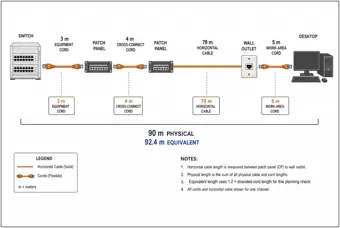
Structured Copper Cabling Channel
Patch panels, rack equipment, outlets and a workstation show the permanent link and patch cords in a structured copper channel.
View drawing →Explore network engineering illustrations of real equipment: switches, server racks, fiber cabling, wireless towers, satellite dishes and broadband systems.
Public thumbnails · Full-size access with All-Access. View pass options
Patch panels, copper channels, fiber routes, connectors and physical link testing.
Patch panels, rack equipment, outlets and a workstation show the permanent link and patch cords in a structured copper channel.
View drawing →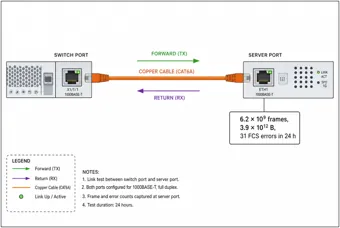
A switch and server test arrangement connects Ethernet port measurements to the equipment and physical link being tested.
View drawing →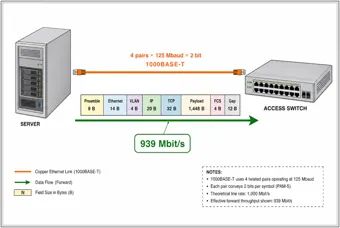
Servers and an access switch illustrate how multiple copper links contribute to aggregate throughput.
View drawing →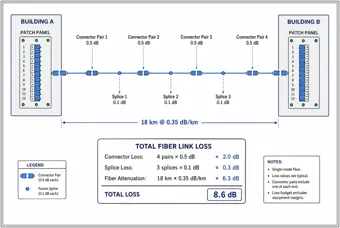
Two building patch panels, fiber connectors and splices illustrate the components of an optical loss budget.
View drawing →Floor switches, risers, office access points and power over Ethernet.
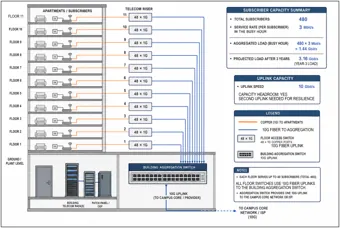
A building cutaway shows floor switches, vertical cabling and core equipment used to estimate building network demand.
View drawing →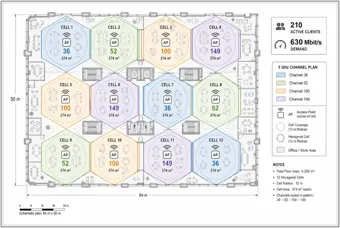
An office floor plan with workstations and access points illustrates how coverage and user demand guide Wi-Fi planning.
View drawing →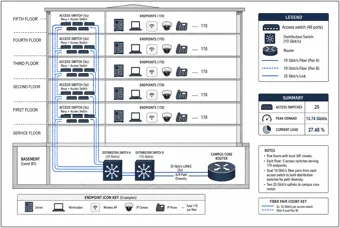
A multistory building with phones, laptops, access points and switches shows an enterprise network from endpoints to the core.
View drawing →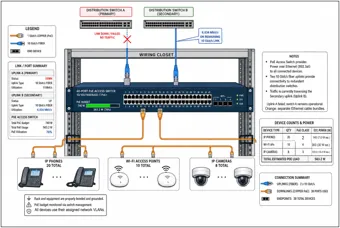
A closet switch powering an access point, phone and camera illustrates the device loads in a PoE power budget.
View drawing →Street cabinets, copper loops, fiber-coax access and branch backup links.
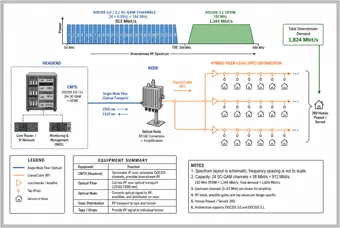
A headend, optical node, coax distribution and houses show the physical path of a hybrid fiber-coax access network.
View drawing →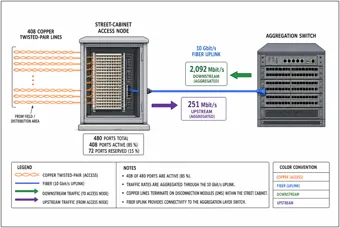
A street cabinet and fiber aggregation switch illustrate the transition from optical transport to copper subscriber access.
View drawing →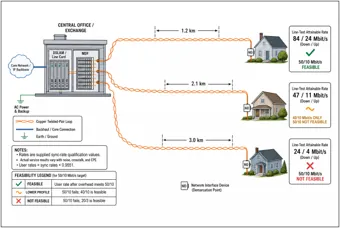
A central office and homes at different distances illustrate how copper loop length affects DSL access performance.
View drawing →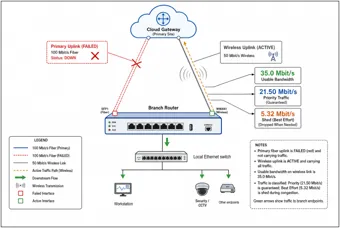
A branch router, primary fiber path and cellular backup illustrate redundant Internet access for office devices.
View drawing →Microwave towers, Fresnel clearance, cellular radios, fronthaul and backhaul.
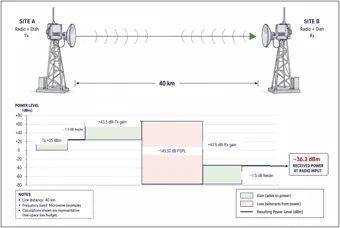
Two lattice towers and directional antennas illustrate a point-to-point microwave link and its received-power budget.
View drawing →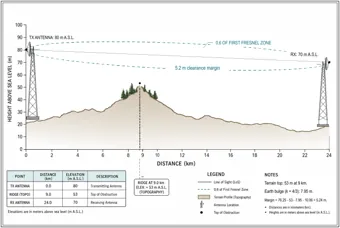
Microwave towers above a terrain profile illustrate line of sight, earth curvature and Fresnel-zone clearance.
View drawing →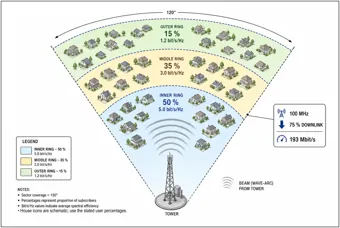
A sector antenna on a tower serves nearby homes, connecting coverage geometry with shared wireless demand.
View drawing →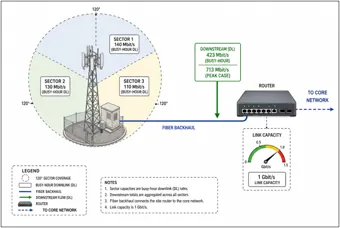
A cellular tower and site router illustrate the combined throughput that sector radios place on the backhaul connection.
View drawing →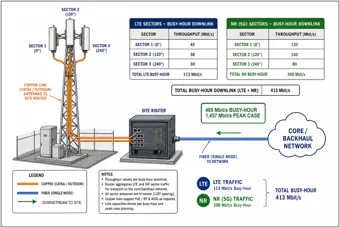
Tower radios, baseband equipment and transport links show the physical components behind mobile backhaul calculations.
View drawing →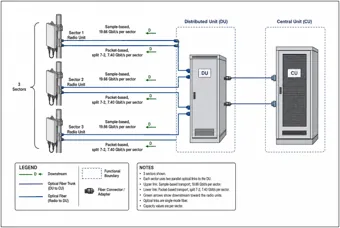
Antennas, radio units, distributed units and central units illustrate the fiber transport chain in a disaggregated radio network.
View drawing →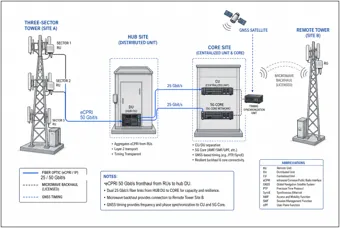
Cell towers, baseband equipment and aggregation routers show a mobile transport network from the radio site toward the core.
View drawing →Ground dishes, orbital geometry, downlink budgets and rain fade.
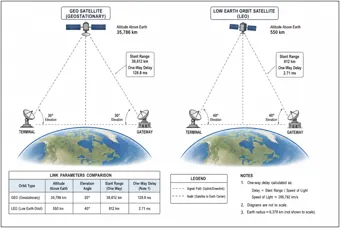
Ground dishes and satellites above Earth show the different propagation paths for geostationary and low-Earth-orbit systems.
View drawing →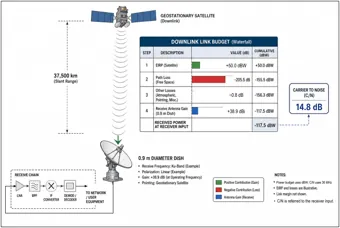
A satellite and ground dish connect downlink power, propagation losses and terminal reception to physical equipment.
View drawing →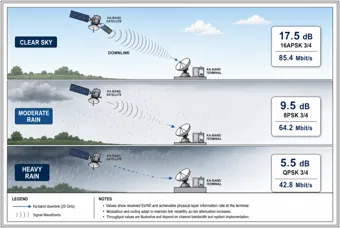
A ground dish under clear skies and rainy conditions illustrates how weather reduces satellite link margin.
View drawing →Server racks, storage arrays, leaf-spine switches, UPS systems and cooling airflow.
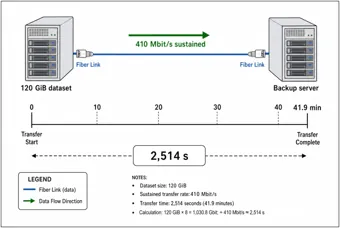
Storage and backup servers connected by optical fiber relate a physical data transfer to link rate and completion time.
View drawing →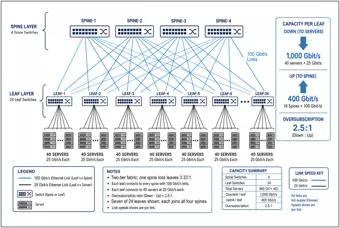
Physical switches and server racks show how leaf and spine layers connect a data center fabric.
View drawing →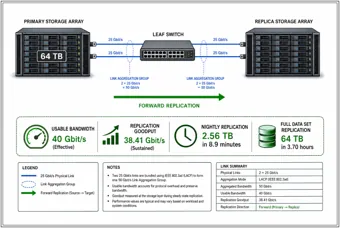
Storage arrays and network switches illustrate the physical connection used to replicate data between storage systems.
View drawing →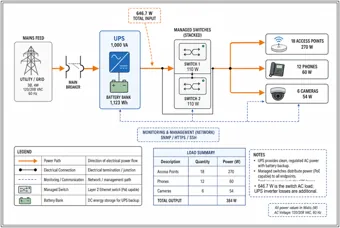
A radio mast, UPS and DC distribution equipment illustrate the power path that keeps a communications site operating.
View drawing →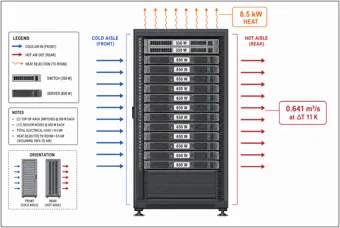
A server rack with cooling airflow illustrates how electrical load becomes heat that the cooling system must remove.
View drawing →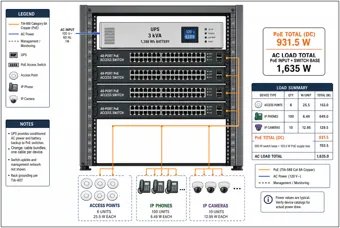
A rack of switches and servers illustrates equipment power demand and the resulting heat load in a network closet.
View drawing →Inspection firewalls and appliance clusters under reduced capacity.
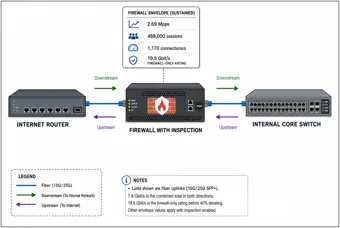
An Internet router, inspection firewall and core switch relate traffic processing requirements to installed security equipment.
View drawing →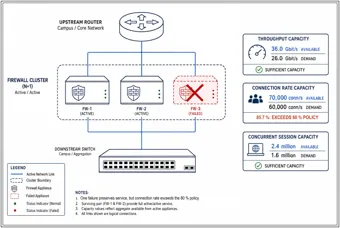
A cluster of firewall appliances illustrates available inspection capacity when one member is out of service.
View drawing →These labeled drawings connect network calculations to the hardware that carries traffic. Follow cabling through patch panels and building risers, compare access technologies, trace radio and satellite links, and inspect the racks, power supplies and cooling behind network services.
Browse copper and fiber channels, office Wi-Fi, PoE switches, broadband cabinets, microwave towers, cellular transport, satellite terminals, data center switching, storage replication, firewalls, UPS equipment and rack cooling.
Choose a subject, then open a drawing for its description and full-size viewer. Thumbnails show the composition; use the unlocked image to inspect labels and fine lines. Full-size drawings preserve the original detail so you can inspect labels and fine lines.
Labeled reference illustrations. Browse copper and fiber channels, office Wi-Fi, PoE switches, broadband cabinets, microwave towers, cellular transport, satellite terminals, data center switching, storage replication, firewalls, UPS equipment and rack cooling.
Thumbnails are free to browse. Your All-Access Pass unlocks the full-size drawings.
Yes. The gallery is designed for desktop computers, phones and tablets.
No. These are educational reference illustrations, not construction documents or verified project designs. Confirm calculations, dimensions, member selections and code requirements with an appropriately qualified professional before real work.
Educational reference only. Illustrations are conceptual and may simplify real construction. They do not certify calculations or replace project documents, applicable standards or professional review.