Construction & Project Delivery Software
Connect BIM coordination, scheduling, estimating, field records and project information across construction delivery.
Read the free drawing guide ↓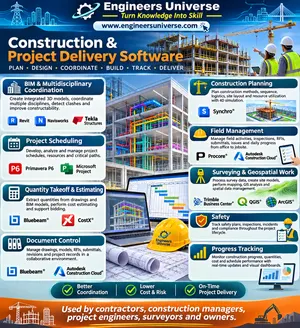
Read the software categories and workflow example below, or open the original poster with All-Access. Use the full-size new-tab link to zoom into labels.
Software categories and practical reading guide
Connect BIM coordination, scheduling, estimating, field records and project information across construction delivery. Start with the task and required output, then compare the software categories rather than choosing by logo alone.
Match each software family to its purpose
- BIM and coordinationRevit, Navisworks and Tekla Structures. Develop discipline models and coordinate interfaces. Model authoring, clash review and fabrication detailing are distinct tasks.
- Scheduling and construction sequencingPrimavera P6, Microsoft Project and SYNCHRO. Manage activities and dependencies; connect a suitable 3D model to a schedule for 4D sequence review.
- Quantity takeoff and estimatingBluebeam and CostX. Measure quantities and support cost estimates, checking drawing scale, model scope and revision first.
- Document and field managementBluebeam, Autodesk Construction Cloud and Procore. Organize drawings, RFIs, submittals, inspections and field issues using the selected products and project workflows.
- Surveying and spatial informationTrimble Business Center, QGIS and ArcGIS. Process or organize spatial information appropriate to the tool. Confirm coordinate systems, survey control and data quality.
- Safety and progress reviewProject safety records and reporting dashboards. These are workflow categories in the poster, not named standalone products. Connect observations and updates to accountable owners and approved records.
Coordinate before the installation starts
In a fictional plant-room project, compare coordinated equipment and pipe routes, check the installation sequence, record an access conflict and track its resolution to an approved revision. A clash-free model does not establish safe construction sequencing or complete site compliance.
Use and limitations: This is a selective educational overview, not a ranking or complete product catalog. Third-party software, licenses and subscriptions are not included with EngineersUniverse All-Access. Product names and logos belong to their respective owners; inclusion does not imply endorsement. Features, compatibility and educational eligibility depend on product, version and license. Verify these with the vendor before selecting software.
Official references
Public reading guide updated . The full-size drawing requires All-Access.