Product Development & Manufacturing Software
Follow a product from CAD and simulation to machining, lifecycle management, electronics and quality.
Read the free drawing guide ↓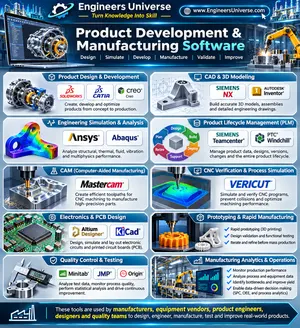
Read the software categories and workflow example below, or open the original poster with All-Access. Use the full-size new-tab link to zoom into labels.
Software categories and practical reading guide
Follow a product from CAD and simulation to machining, lifecycle management, electronics and quality. Start with the task and required output, then compare the software categories rather than choosing by logo alone.
Match each software family to its purpose
- Product design and CADSOLIDWORKS, CATIA, Creo, Siemens NX and Autodesk Inventor. Create parts, assemblies and drawings; confirm the required formats and manufacturing deliverables.
- Engineering simulationAnsys and Abaqus. Study structural, thermal and other physical responses with appropriate solvers, assumptions and validation.
- Product lifecycle managementSiemens Teamcenter and PTC Windchill. Control product information, revisions and release workflows across teams.
- Manufacturing preparationMastercam and VERICUT. Prepare machining toolpaths, then verify CNC programs against the intended machine and setup.
- Electronics and PCB designAltium Designer and KiCad. Develop circuit schematics and PCB layouts, then check electrical rules and manufacturing outputs.
- Quality and improvementMinitab, JMP and Origin. Analyze measurements and process variation. Prototyping and operations analytics are activities, not additional software products in this poster.
From bracket model to inspected part
For a sample mounting bracket, create the CAD model, check a stated load case, prepare the machining setup, verify the CNC program and compare measured dimensions with tolerances. Keep the released revision attached to every output; a successful simulation alone does not validate the manufactured part.
Use and limitations: This is a selective educational overview, not a ranking or complete product catalog. Third-party software, licenses and subscriptions are not included with EngineersUniverse All-Access. Product names and logos belong to their respective owners; inclusion does not imply endorsement. Features, compatibility and educational eligibility depend on product, version and license. Verify these with the vendor before selecting software.
Official references
Public reading guide updated . The full-size drawing requires All-Access.