Engineering Software for Students
Match university engineering subjects to software families for modeling, programming, analysis and projects.
Read the free drawing guide ↓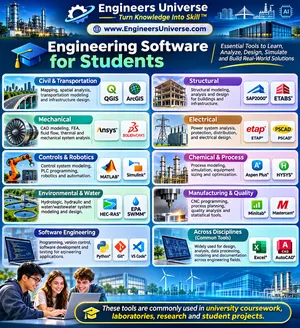
Read the software categories and workflow example below, or open the original poster with All-Access. Use the full-size new-tab link to zoom into labels.
Software categories and practical reading guide
Match university engineering subjects to software families for modeling, programming, analysis and projects. Start with the task and required output, then compare the software categories rather than choosing by logo alone.
Match each software family to its purpose
- Civil, transportation and structuresQGIS, ArcGIS, SAP2000 and ETABS. Separate mapping and spatial analysis from structural modeling and design; the tools serve different parts of infrastructure work.
- Mechanical and electrical studiesAnsys, SOLIDWORKS, ETAP and PSCAD. Connect geometry and physical assumptions to mechanical simulation, power-system studies and electromagnetic transients.
- Controls and process modelingMATLAB, Simulink, Aspen Plus and Aspen HYSYS. Use mathematical models for controls or process flowsheets. The required models and licenses depend on the course.
- Water and manufacturingHEC-RAS, EPA SWMM, Minitab and Mastercam. Distinguish river hydraulics, drainage modeling, statistical quality analysis and CNC programming.
- Programming and shared project toolsPython, Git, Visual Studio Code, Excel and AutoCAD. Combine coding, version control, editing, spreadsheets and drafting according to the deliverable, rather than learning every tool at once.
Choose a first project, then a tool
For a campus drainage exercise, start with the catchment, rainfall, units and required output. Use mapping to organize site data and an appropriate drainage model to explore runoff. Record assumptions and compare a simple hand estimate with the model before presenting the result.
Use and limitations: This is a selective educational overview, not a ranking or complete product catalog. Third-party software, licenses and subscriptions are not included with EngineersUniverse All-Access. Product names and logos belong to their respective owners; inclusion does not imply endorsement. Features, compatibility and educational eligibility depend on product, version and license. Verify these with the vendor before selecting software.
Official references
Public reading guide updated . The full-size drawing requires All-Access.